Free skill for ChatGPT and Claude
Marketing your customers read to the end.
AI drafts sound like AI: the launch post is a feature list, the email reads like a template, and customers scroll past both. The Writer is one free file you add to ChatGPT or Claude. From then on, "write the launch post" or "draft an email to all our customers" comes back sounding like a professional author wrote it, and your customers read it to the end.
Three plain-text files. Free, no signup, works in ChatGPT and Claude.
The same announcement, written twice.
Two copies of the same AI got the same product brief and the same request: write the LinkedIn post announcing the feature. One had The Writer. Both posts are below, whole and unedited.
Without The Writer
Kestrel CRM
Company page post
Falcon Query Engine ships with Kestrel 8.2 on September 2.
If your workspace holds millions of contacts, you know the failure mode. You change one filter on an account list and then you wait. A dashboard that takes eleven seconds isn't a dashboard anymore. It's a report you open once a week, if that.
Falcon changes what happens underneath. Instead of scanning the full table on every load, Kestrel now maintains rollups incrementally in a columnar cache. When a record changes, the affected rollups update within five seconds, and your dashboards and list views read precomputed deltas rather than recalculating aggregates from scratch.
Internal benchmark on our reference organization (2.4M contact records, 90 days of activity history, 62 custom fields):
Dashboard load, p50: 6.2s → 210ms Dashboard load, p95: 11.4s → 480ms Dashboard timeout rate: 3.1% → 0.02% Saved-report CSV export: 84s → 9s Mobile cold open: 14s → 1.9s Account list filter change: 4.8s → 130ms
Nothing to install, no data migration, no pricing change. Existing dashboards, saved reports, and API report endpoints pick up the new engine on their own.
Where it doesn't help yet, since you'll find this out anyway:
• Custom SQL blocks in dashboards bypass the cache and run at their previous speed. • Workspaces over 5M records need a one-time index build that can take up to 40 minutes. It runs in the background, and dashboards stay available on the old path until it finishes. • Custom-object rollups are slower to refresh than standard objects, p95 around 8 seconds against the 5-second guarantee we hold for standard objects.
On by default for Growth and Enterprise at GA. Starter is next in line, and we'll name a date once we're confident in it.
#CRM #ProductUpdate #DataEngineering
With The Writer
Kestrel CRM
Company page post
Eleven seconds.
That was the p95 load time on a Kestrel dashboard in a workspace with 2.4 million contacts. Long enough that people stopped opening dashboards in front of a customer and started exporting the night before instead. Three loads in a hundred never finished at all. Our support queue carried roughly 240 of those complaints a month.
The data was fine. The counting was the problem. Every dashboard load and every filter change on an account list scanned the full table from the top, recomputing numbers that had not moved since the last time anyone looked.
Kestrel 8.2 ships the Falcon Query Engine, and it stops doing that. Rollups are maintained incrementally against a columnar cache. When a record changes, the rollups it touches update within five seconds, so a dashboard reads a precomputed delta instead of recalculating the world.
On our reference org (2.4M contacts, 90 days of activity history, 62 custom fields):
Dashboard p50 load: 6.2 s → 210 ms Dashboard p95 load: 11.4 s → 480 ms Timeout rate: 3.1% → 0.02% Saved-report CSV export: 84 s → 9 s Mobile cold open: 14 s → 1.9 s Account list filter change: 4.8 s → 130 ms
Here is what those numbers buy. Someone in the room asks what the pipeline looks like for enterprise accounts in the Northeast. You change the filter while they are still talking, and the answer is on the screen before they finish the question. The report becomes something you interrogate live, at the speed of the conversation.
The honest limits: custom SQL blocks bypass the cache and run at the old speeds. Workspaces above 5 million records need up to 40 minutes for the first index build, which runs in the background while dashboards keep serving on the old path. Custom-object rollups currently sit at 8 seconds p95 rather than under 5.
Falcon is on by default for Growth and Enterprise at 8.2 GA on September 2. Nothing to migrate and nothing to switch on. Pricing is unchanged. Existing dashboards, saved reports, and API report endpoints pick up the engine on their own. Starter plans follow in 8.3.
Eleven seconds used to decide whether the question got asked out loud. Now it does not come up.
When to use this
Reach for it when a customer, a prospect, or a client has to read the thing and act on it without you in the room. It works from whatever is real: a launch, a result, a number worth reporting, a win a client paid for. It writes short fiction too, and the download ships a story to prove it, but the day job is the writing that sells.
Use it for
- Launch posts and announcements
- The release lands on what your customer can now do, with the measured numbers underneath as proof. The two posts above are this exact job.
- Sales emails and follow-ups
- Written to earn the reply: one concrete detail from the buyer's world up front, one clear next step at the end, and nothing that reads like a template.
- Case studies and customer stories
- The before is a real Tuesday, the after is a decision your customer made differently. Buyers recognize themselves, and the story sells before the call.
- Client updates and reports
- The month reads as one story with a cause running through it, so the client remembers exactly what they paid for.
- Newsletters and founder posts
- Reads like a letter with a point, instead of a list of links. Readers finish it, then forward it.
Not for
- Spec sheets and price lists
- People search those. A narrative buries the line they came for.
- A quick status answer
- If one sentence answers it, send the one sentence.
How to use this
Install once. Then ask in plain words.
"Write a LinkedIn post about the new feature, using The Writer." "Draft an email that goes out to all our customers." "Make this readable." That is the whole workflow.
ChatGPT
Skills are live on Business, Enterprise, Edu and Healthcare plans; an admin may need to switch them on. On Plus or Free, use a project instead: paste the guide into its instructions and add the two example files. Same result.
- 01
Open the Skills page: pick Plugins in the sidebar and switch to the Skills tab, or go straight to chatgpt.com/skills.
Plugins → Skills - 02
Click the plus button, then upload from your computer.
+ → Upload from your computer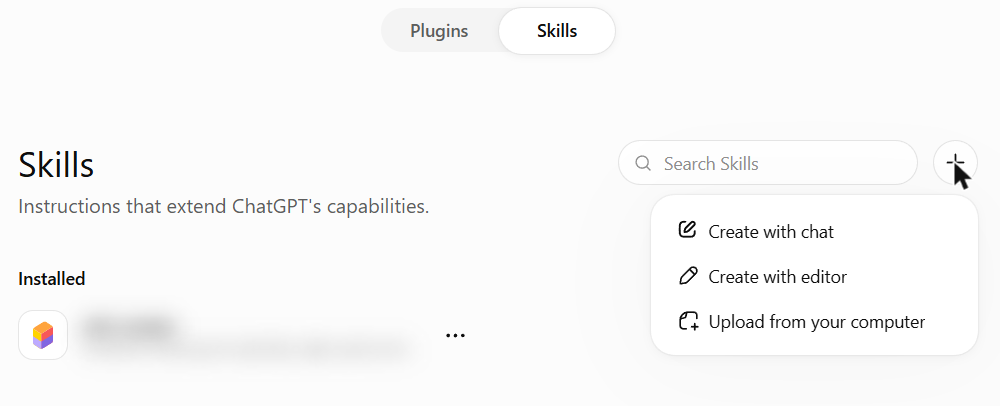
- 03
Select the-writer-skill.zip exactly as downloaded.
ChatGPT expects a zip holding one folder with SKILL.md inside. That is exactly what the download is.
- 04
Ask for the writing in any chat.
Claude (web or desktop)
Works on Free, Pro, Max, Team and Enterprise plans.
- 01
In settings, open Capabilities and check that cloud code execution is on. Skills need it.
Settings → Capabilities → Cloud code execution and file creation
- 02
In the sidebar, click Customize. It opens on your Skills list.
Customize → Skills - 03
Click Add, then Upload a skill.
Add → Upload a skill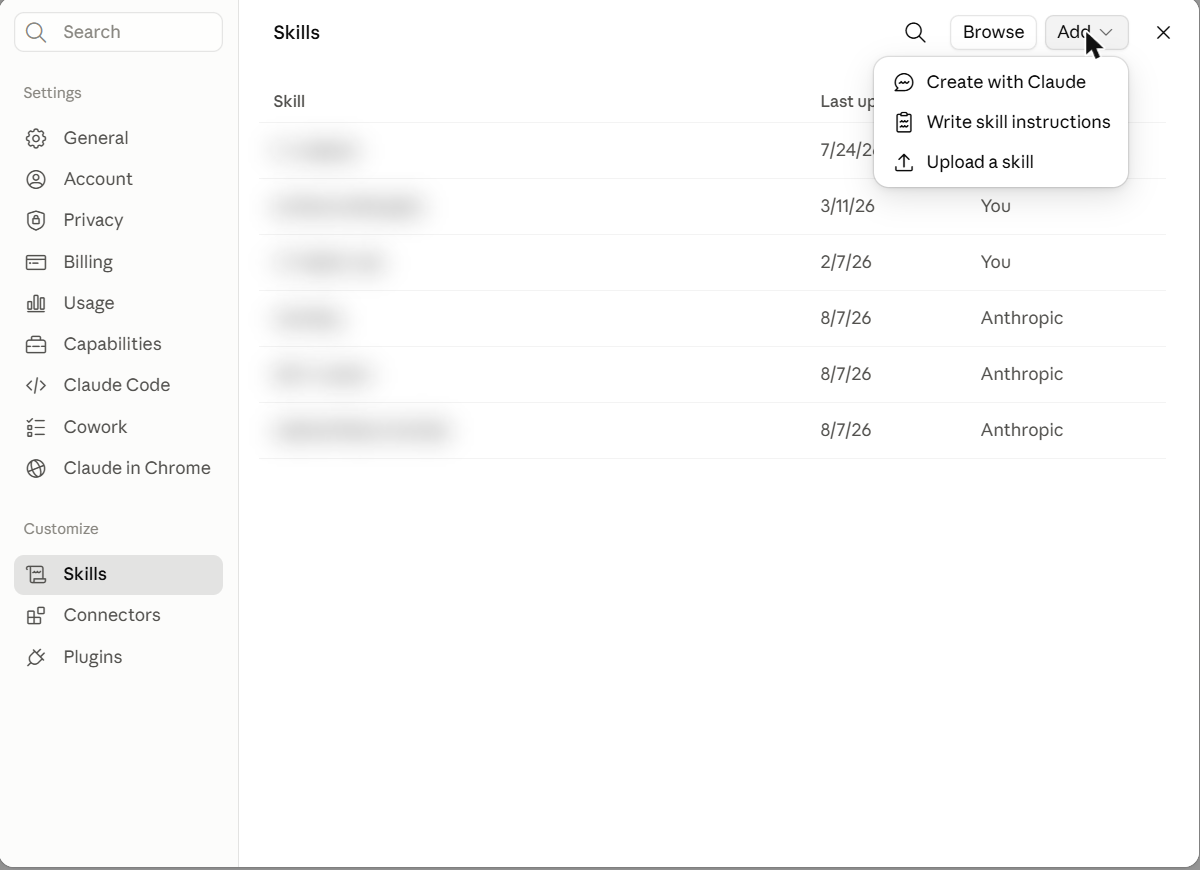
- 04
Select the-writer-skill.zip.
Upload the zip exactly as downloaded. Do not unzip it first.
- 05
Start a new chat and ask for the writing.
On Claude Code? Unzip the download into your skills folder (~/.claude/skills) and it loads on the spot.
We wrote this for our own marketing.
Launch posts, client recaps, and outreach here all go through it, and the guide got sharp because the writing had to survive an owner who stops reading at the first dull paragraph. Take it, run it on your next launch, and cut whatever does not fit.
Who made this
GraniteAI builds and runs AI for small and midsized businesses, out of Manchester, New Hampshire. Follow-ups that stop slipping, a feed that stays alive, and a ChatGPT that knows the market a business actually works in. That last one is the Mica Intelligence Engine: an owner asks what to charge or which town to work next, and the answer arrives backed by verified facts about their own county and trade, each carrying a source and a date. See the engine
The next free file
The Writer settles how the post reads. What goes in it still has to come from your business, and the AI you are asking does not have those facts. Point us at your website and we email you a context kit that makes ChatGPT or Claude answer from your business instead of guessing about it. Free, and you can read every file before you use it.
If the business you write for is a local one, the daily post is its own job. Mica takes that end for trades like cleaning and roofing, drafting and publishing on a schedule, so the feed stays current through the months nobody has an hour to sit down and write. See Mica